
AI Image Animator: Turn Static Photos into Dynamic Videos
Transform static images into dynamic videos with AI-powered animation tools. Learn how to create engaging content for social media, e-commerce, and marketing campaigns.
TL;DR: AI image animators use artificial intelligence to transform static photos into dynamic videos in minutes. These tools eliminate the need for video editing skills, making professional video creation accessible for e-commerce merchants, marketers, and content creators through simple upload-and-generate workflows.
Static images no longer cut it in today's video-first digital landscape. According to industry research, social media posts with animated elements receive 120% more engagement than static images, while businesses report conversion rate increases of up to 80% when using dynamic visuals. AI image animators bridge this gap by converting still photos into engaging video content without requiring filming equipment, editing expertise, or technical skills.
Whether you're an Amazon seller showcasing products, a marketing team creating ad campaigns, or a content creator building social media presence, AI image animation technology delivers minute-level video production that traditional methods can't match.
What Is an AI Image Animator?
An AI image animator leverages artificial intelligence to turn static images into dynamic animations. Unlike basic slideshow tools that simply add transitions between frames, modern AI animators analyze image content, understand depth and motion potential, then generate intelligent animations that bring photos to life.
These tools use advanced algorithms to detect objects, faces, landscapes, and other elements within your image. The AI then applies natural movements such as camera pans, zooms, subtle motion effects, facial expressions, and environmental dynamics like swaying trees or flowing water.
Key Capabilities
Content Understanding: The AI identifies what's in your image, whether it's a person, product, landscape, or abstract composition, then applies natural motion accordingly.
Motion Generation: The system generates appropriate animations based on content. Portraits receive subtle head movements and expressions, while product photos get professional camera movements and highlighting effects.
Style Customization: Guide animations through text prompts describing specific movements, or use preset styles for common use cases.
How AI Image Animators Work
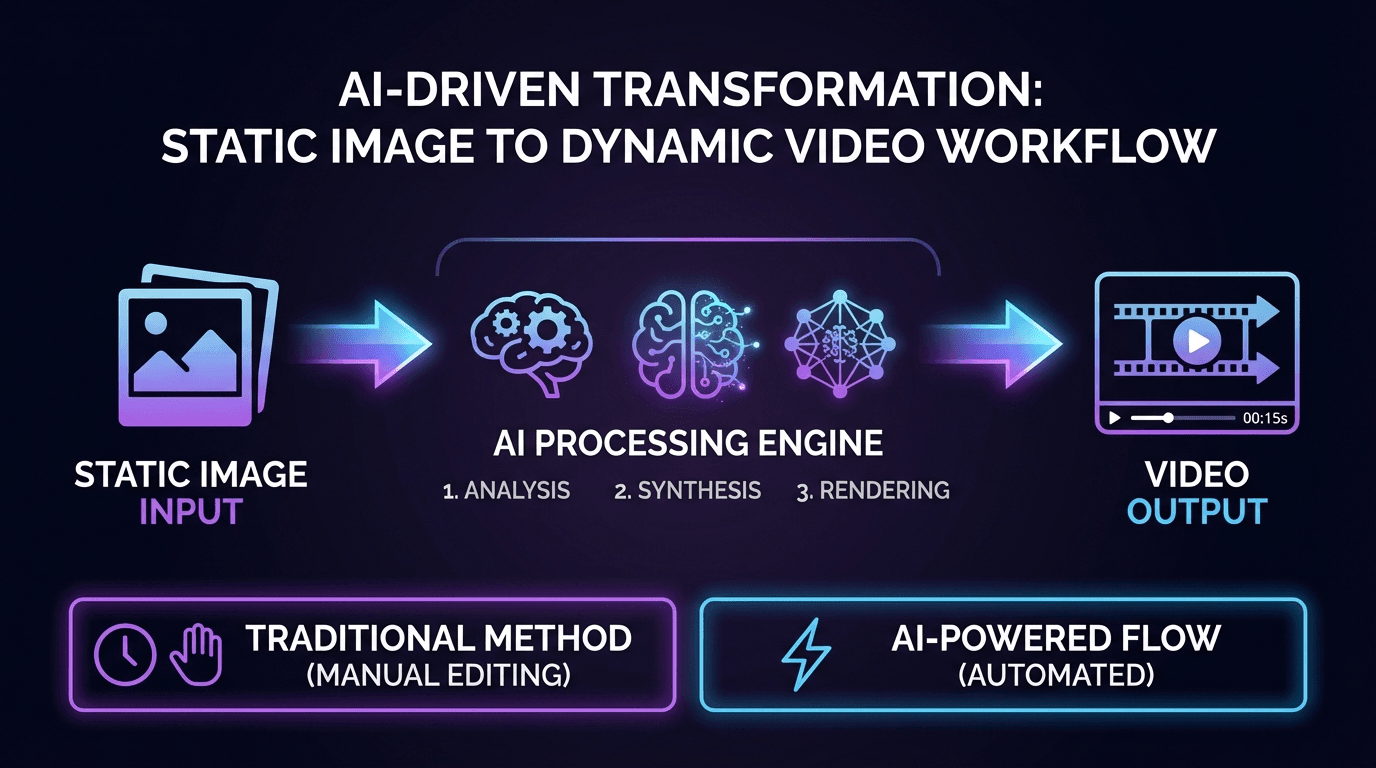
The technology behind AI image animation combines computer vision, generative AI, and video synthesis. Understanding this workflow helps you create better results and troubleshoot issues when they arise.
The Technical Process
When you upload an image, computer vision algorithms analyze content and identify depth layers. Generative AI models then predict natural movement patterns, whether that's realistic head movements for portraits or showcase angles for products. The system generates intermediate frames to create smooth video sequences at 30-60 frames per second, then applies final polish through color correction and platform optimization.
Most AI image animators support JPEG, PNG, and WebP formats. High-quality source images above 1080p with good lighting produce the best results. Processing typically takes 3-5 minutes, though this varies based on output complexity.
Step-by-Step Guide to Animating Your Images
Creating animated videos from static images follows a straightforward workflow across most platforms. This process takes minutes rather than hours of manual video editing.
Step 1: Upload Your Image
Select and upload your static image using drag-and-drop or file browsing. Choose images with clear subjects and good composition. Product photos with clean backgrounds, well-lit portraits, and landscape images with distinct elements work best.
Step 2: Customize Animation Settings
After upload, describe the motion you want using text prompts. Be specific but concise. Instead of vague instructions like "make it interesting," use descriptive prompts such as:
- "Gentle camera pan from left to right across the landscape"
- "Subtle zoom focusing on the product with soft lighting"
- "Portrait subject turning head slightly with natural eye movement"
Many platforms also offer preset animation styles you can select instead of writing custom prompts. These presets are optimized for common use cases like product showcases, social media posts, or storytelling sequences.
Step 3: Generate and Download
Click generate and wait for processing to complete. Preview your animation to verify natural motion and visual quality. If needed, regenerate with adjusted prompts. Download in MP4 format for universal compatibility, ensuring resolution matches your distribution channel. Instagram and TikTok use vertical 9:16 format, while YouTube prefers horizontal 16:9.
Best AI Image Animation Tools for 2026
The AI image animation market offers diverse tools with varying capabilities and pricing structures. Here's a breakdown of leading platforms for different use cases.
Keevx: Complete Video Production Platform
Best for: E-commerce merchants and businesses needing multilingual video content with digital avatars
Keevx goes beyond basic image animation by delivering studio-quality videos featuring digital avatars without editing skills. The platform automates the entire video production pipeline, from image to video conversion to avatar and voice cloning.
Key advantages include minute-level production with AI-powered scripts, one-click conversion from Amazon, eBay, Shopify, Etsy, and App Store URLs to video, and video translation and dubbing in 70+ languages with lip-sync. The platform offers 234 diverse avatars, 169 voice options supporting regional languages, and 40+ pre-built video templates for various industries.
Keevx is particularly valuable for cross-border e-commerce where multilingual localization and consistent brand messaging across markets are critical.
EaseMate AI: Quick Social Media Animation
Best for: Content creators and social media managers needing fast turnaround
According to EaseMate's platform, the tool uses Runway and Veo 3 AI models to instantly add natural movements, vivid expressions, and diverse styles to images. The platform emphasizes zero-cost access through daily free credits and produces animations without watermarks.
EaseMate works well for creating quick social media content, animated posts for Instagram and TikTok, and personal creative projects. The simplified interface prioritizes speed over advanced customization.
Vidu AI: Specialized Portrait Animation
Best for: Animating portraits, historical photos, and artwork
Vidu AI focuses on bringing people, animals, and characters to life from still images. The platform handles portraits, paintings, anime characters, and cartoons, making it ideal for creative projects involving historical photos or artistic works.
The tool offers detailed control over facial expressions, head movements, and body language, allowing you to create natural-looking animations of people from still photographs.
AnimateImg: Professional Product Showcases
Best for: Product marketing and commercial photography animation
AnimateImg transforms product photos into dynamic showcases suitable for AI video ads and marketing campaigns. The platform emphasizes professional-grade output quality and commercial licensing.
Features include camera movement presets optimized for product photography, lighting enhancement algorithms, and export options tailored for different advertising platforms.
Professional Applications for Business
AI image animators solve real business challenges across industries. Understanding these applications helps you identify opportunities to improve your own workflows and marketing strategies.
E-Commerce Product Marketing
Static product photos work, but videos sell better. According to industry data, product videos increase conversion rates significantly compared to photo-only listings. AI image animation lets you create product showcase videos from existing photography without reshoots or video production costs.
Transform a single product photo into rotating 3D-style views, zoom sequences highlighting features, or dynamic presentations that catch shopper attention. For cross-border sellers, combine image to video conversion with multilingual voiceovers to create localized versions for different markets.
Social Media Content Creation
Social platforms prioritize video content in their algorithms. AI image animators help content creators maintain consistent posting schedules by converting still images into video posts that receive better reach and engagement.
Create animated quote graphics, bring infographics to life with motion, or transform behind-the-scenes photos into story content. The ability to batch-process multiple images means you can prepare weeks of content in a single session.
Advertising Campaigns
Digital advertising platforms favor video formats with higher CPMs and better performance metrics. AI animation converts existing creative assets into video ads without the cost of traditional video production.
Animate hero product shots for Facebook and Instagram ads, create eye-catching display ads with motion, or develop video variations for A/B testing. The speed of AI generation enables rapid creative iteration based on campaign performance data.
Training and Educational Content
Animate diagrams to show processes, bring historical photos to life in presentations, or create engaging onboarding materials. For global organizations, combining image animation with video translation creates training materials that work across language barriers.
Technical Considerations and Best Practices
Image Quality and Prompts
Start with high-quality source images above 1080p resolution. Good lighting, clear focus, and strong composition produce better results. Avoid overly compressed JPEGs; use PNG files or high-quality JPEGs at 90% quality or higher.
For prompts, balance specificity with simplicity. Shorter, focused descriptions like "gentle camera pan across landscape" work better than lengthy instructions. Test variations and save successful prompts as templates for future projects.
Platform Optimization
Generate platform-specific versions rather than reusing a single format. Instagram favors 9:16 vertical video, YouTube prefers 16:9 horizontal, and LinkedIn performs well with square 1:1 formats. When creating multiple animations, batch processing saves time. Upload images simultaneously, apply consistent styles, and generate all videos in one session.
Frequently Asked Questions
What file formats do AI image animators support?
Most platforms accept JPEG, PNG, and WebP formats. Output is typically MP4 video, though some tools offer GIF, WEBM, or MOV options.
How long does it take to animate an image?
Most AI image animators generate videos in 3-5 minutes. Simple animations may complete in under a minute, while complex animations might take 10 minutes. Batch processing handles multiple animations simultaneously.
Can I use AI-animated videos commercially?
Most paid plans include commercial licenses for marketing and advertising. Free tiers may restrict commercial use. Always review license terms before business use.
Do AI animators work with portraits and faces?
Yes, modern platforms handle portraits effectively, generating natural facial movements, expressions, and subtle animations. Advanced tools create realistic head turns, eye movements, and speaking animations when combined with audio.
Can I control the animation style and movement?
Most platforms offer control through text prompts describing desired motion, plus preset animation styles. Advanced platforms provide parameters for speed, direction, and intensity.
Conclusion
AI image animators democratize video content creation by transforming static photos into engaging animations without technical skills or expensive equipment. These tools serve diverse needs from social media content to professional e-commerce marketing, delivering minute-level production that traditional workflows can't match.
Success lies in choosing the right platform for your use case. Content creators benefit from quick-turnaround tools, while businesses requiring multilingual content and digital avatars find comprehensive solutions in platforms like Keevx. Understanding your distribution channels and content goals ensures smooth integration with existing workflows.
Ready to transform your static images into dynamic video content? Start Free Trial and create professional animated videos in minutes.
