
How to Translate YouTube Videos to Any Language
Discover three proven methods to translate YouTube videos—from free built-in tools to AI-powered dubbing. Reach global audiences across 70+ languages in minutes.
TL;DR: Translating YouTube videos lets you reach global audiences across 70+ languages. Use YouTube's built-in auto-translate for viewing, YouTube Studio for creator translations, or AI-powered platforms like Keevx for minute-level video translation with lip-sync and voice dubbing—no technical skills required.
Breaking language barriers on YouTube opens massive growth opportunities. With over 2 billion users worldwide, translating your videos can multiply your reach exponentially. Whether you're an e-commerce seller localizing product demos or a content creator expanding internationally, video translation transforms your content into a global asset.
This guide walks through every method to translate YouTube video content—from basic subtitle translation to advanced AI dubbing with voice cloning.
Understanding YouTube Video Translation Options
Video translation on YouTube comes in three primary forms: subtitles, dubbed audio, and metadata translation.
Subtitle translation converts spoken dialogue into text in another language, displayed at the bottom of the video. This method preserves the original audio while making content accessible to non-native speakers. Subtitle translation is the most common approach due to its simplicity and cost-effectiveness.
Audio dubbing replaces the original voice with translated speech in the target language. Modern AI dubbing tools can match lip movements to translated words, creating a seamless viewing experience. This method works particularly well for educational content, product demonstrations, and marketing videos.
Metadata translation involves translating video titles, descriptions, and tags. Every translated language feeds into search algorithms, helping videos rank in international markets. For content creators, metadata translation is essential for discoverability across global YouTube searches.
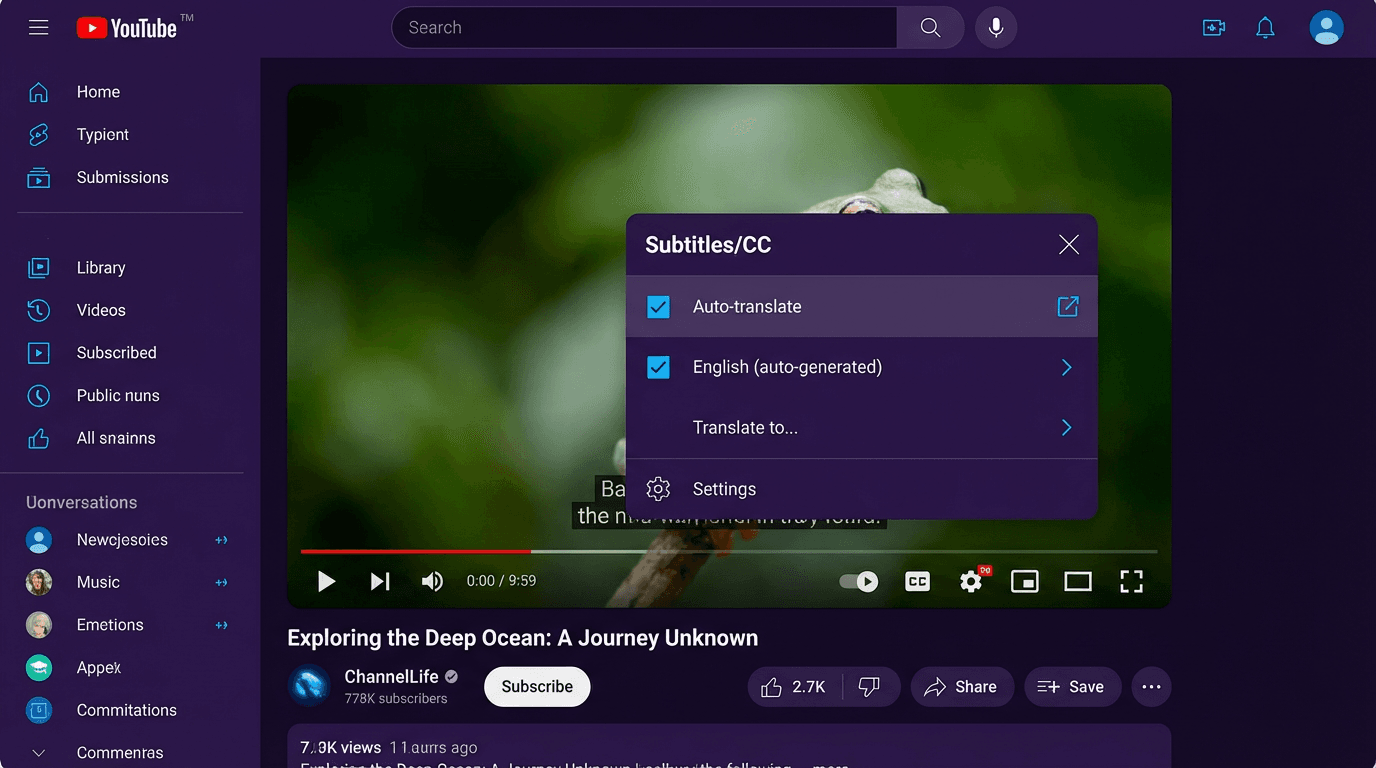
Method 1: Using YouTube's Built-in Auto-Translate (For Viewers)
YouTube's native translation feature lets viewers watch videos in their preferred language without third-party tools. This method works for any video with existing captions or auto-generated subtitles.
Step-by-Step Process
Step 1: Open the YouTube video. Look for the "CC" (closed captions) button at the bottom-right corner of the video player. Click it to enable subtitles.
Step 2: Click the gear icon (Settings) next to the CC button. Select "Subtitles/CC" from the menu.
Step 3: Choose "Auto-translate" from the submenu. You'll see a list of over 100 available languages.
Step 4: Select your preferred language. YouTube will automatically translate the existing captions. The translation appears in real-time as the video plays.
Limitations to Consider
YouTube's auto-translate relies on machine translation, which may miss context or cultural nuances. Videos without existing captions won't have the auto-translate option available. Translation quality varies depending on language pairs—common combinations typically perform better than rare ones.
Method 2: Translating Your Own YouTube Videos (For Creators)
Content creators have more control over translation quality through YouTube Studio. This method allows uploading custom-translated subtitles, translating metadata, and managing multiple language versions.
Translating Video Subtitles
Step 1: Sign in and navigate to YouTube Studio. Click "Content" to view your uploaded videos.
Step 2: Select the video you want to translate. Click the pencil icon under "Details."
Step 3: Click "Subtitles" in the left menu. Click "Add Language" and choose your target language.
Step 4: Choose from three options for adding translated subtitles:
- Upload file: Import a professionally translated SRT or VTT file with precise timecodes
- Auto-sync: Paste translated text and let YouTube sync it automatically
- Type manually: Enter translations line by line with custom timing
For professional results, uploading pre-translated subtitle files ensures accuracy and proper synchronization.
Translating Titles and Descriptions
After adding a language, locate the "Title & description" section. Click "Add" to enter translated versions of your video title and description. These translations appear to viewers browsing YouTube in those languages, significantly improving international discoverability. Translated metadata helps videos rank in local search results, multiplying your views across global markets.
Method 3: AI-Powered Video Translation Platforms
AI translation platforms revolutionize video localization by automating subtitle generation, voice dubbing, and even lip-sync adjustments. These tools dramatically reduce production time from days to minutes.
How AI Translation Works
Modern AI platforms analyze your video's audio track, transcribe the speech, translate the text, and optionally generate dubbed audio in the target language. Advanced systems adjust lip movements to match translated words, creating natural-looking results.
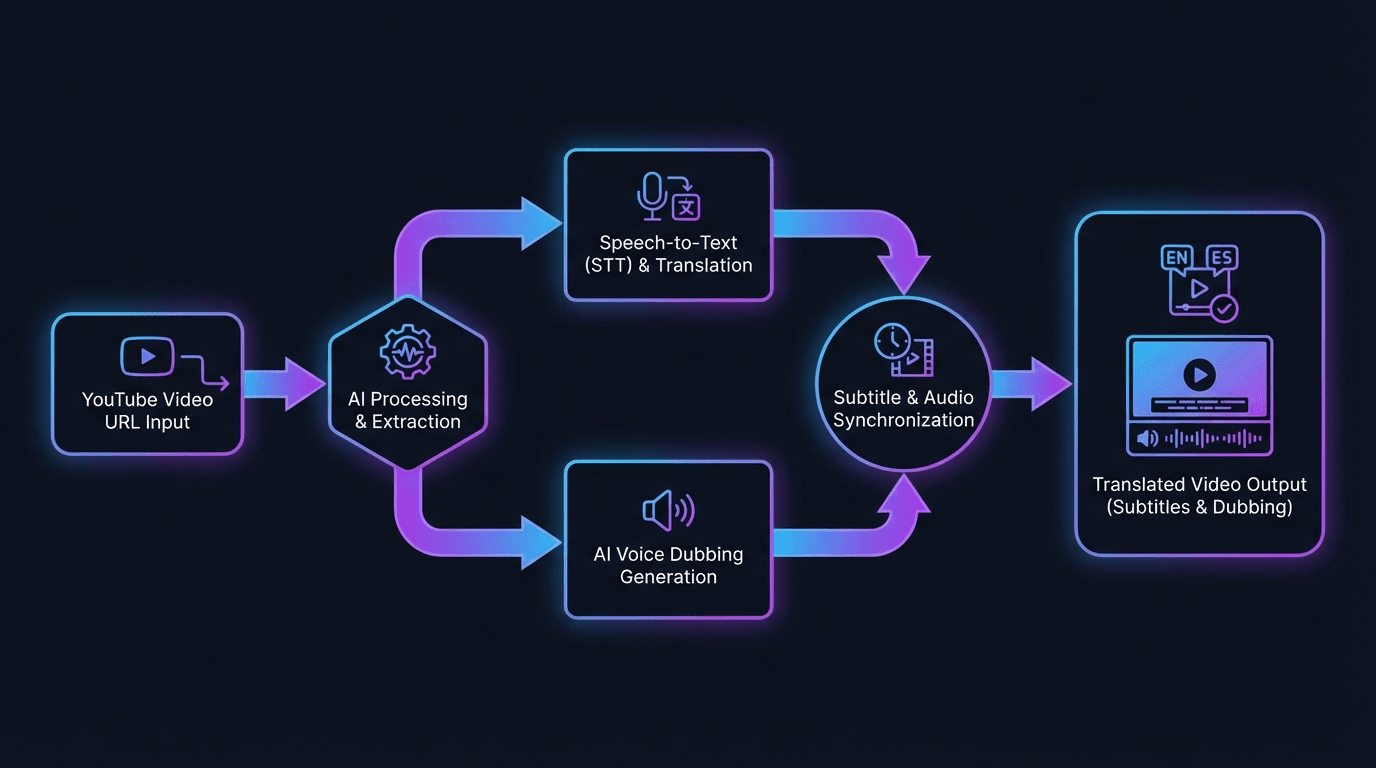
Using Keevx for Video Translation
Keevx stands out for cross-border content creators needing rapid multilingual video production. The platform specializes in video translation and dubbing across 70+ languages with lip-sync technology.
Best for: E-commerce sellers, marketing teams, and content creators scaling internationally
Key features:
- One-click YouTube URL to translated video conversion
- 234 digital avatars with voice cloning for authentic dubbing
- Batch translation for multiple videos simultaneously
- Cross-platform optimization for YouTube, TikTok, and social media
- No editing or technical skills required
Workflow: Paste your YouTube video URL, select target languages, choose an avatar and voice, and generate translated videos in minutes. The platform automatically handles script translation, voice dubbing, and lip-sync adjustments.
Alternative AI Translation Tools
Notta: Specializes in transcription and subtitle generation for YouTube videos. Supports over 100 languages with speaker identification for multi-person videos.
Kapwing: Browser-based video editor offering auto-subtitle translation in 70+ languages with dubbing tools and AI voice options.
VEED: All-in-one video editor with translation features. Upload YouTube links directly, generate auto-subtitles, and export SRT files for YouTube upload.
RecCloud: Cloud-based platform focused on YouTube video translation. Enter a URL, select target language, and download translated subtitles or dubbed video files.
Translating YouTube Videos for Business Growth
Video translation directly impacts business metrics across multiple channels. E-commerce merchants using translated product demos report higher conversion rates in international markets, while corporate training departments reduce localization costs.
E-Commerce Applications: Cross-border sellers on Amazon, Shopify, and eBay leverage AI product videos in multiple languages to showcase items to international buyers. Translating product demonstrations and how-to guides removes language barriers that otherwise limit sales. Platforms like Keevx enable one-click conversion of product URLs into multilingual video content.
Marketing and Advertising: AI video ads in local languages perform significantly better than English-only campaigns in non-English markets. Marketing teams use translation tools to create region-specific campaigns without multiplying production budgets. Viral content analysis tools help identify trending topics across regions, which can be replicated using avatar and voice cloning to maintain brand consistency.
Content Strategy: Successful international YouTube channels follow a multilingual content strategy—create once in your primary language, then distribute translated versions targeting specific regions. Using market trends analysis, creators identify which languages and regions offer the highest growth potential for their content type.
Best Practices for YouTube Video Translation
Quality translation requires more than running text through automated tools. Follow these guidelines to ensure your translated content resonates with international audiences.
Optimize for Cultural Context: Direct translation often misses cultural references and idioms that don't transfer between languages. Professional translators adapt content to local cultural norms while preserving your core message.
Maintain Consistent Terminology: Build a glossary of key terms, product names, and branded phrases with their approved translations. This ensures consistency across all your translated videos.
Prioritize High-Value Languages: Focus initial translation efforts on languages with large YouTube audiences: Spanish, Hindi, Portuguese, Indonesian, Japanese, and Korean. These markets offer substantial untapped audiences for English-language creators.
Test and Iterate: Monitor analytics for your translated videos. YouTube Studio shows performance by geography and language. If certain translations underperform, refine the metadata or improve subtitle quality.
Leverage AI for Scale, Humans for Quality: Use AI tools for rapid translation of high-volume content where speed matters. For premium content or flagship campaigns, invest in professional human translation and review.
Technical Considerations and File Formats
Understanding subtitle file formats ensures compatibility when uploading translations to YouTube or other platforms.
SRT (SubRip Text): The most universal subtitle format, containing numbered sequences with timecodes and text. YouTube accepts SRT files for manual subtitle uploads.
VTT (WebVTT): Similar to SRT but with additional formatting options like text positioning and styling. Preferred for web-based video players.
Timing and Synchronization: Accurate timing ensures subtitles appear synchronized with spoken words. When creating custom translations, match subtitle duration to speech patterns in the target language.
After generating translated subtitles in AI platforms, download the file in SRT or VTT format. In YouTube Studio, navigate to your video's subtitle section, add your target language, and upload the file. YouTube automatically applies the timecodes to display subtitles correctly.
Frequently Asked Questions
Can I translate YouTube videos for free?
Yes, YouTube's built-in auto-translate feature is completely free for viewers. Creators can manually type translations at no cost, though this requires significant time investment. Many AI platforms offer free trials—Keevx provides trial access to test video translation capabilities before committing.
How accurate is YouTube auto-translate?
YouTube auto-translate uses Google Translate technology, which provides functional translations but may miss context and idioms. Accuracy varies by language pair—common languages like English to Spanish perform better than rare combinations. For professional use, custom translations or AI platforms with human review deliver better results.
Can I translate videos I don't own?
As a viewer, you can use YouTube's auto-translate on any video with captions. However, creating and distributing your own translated versions of someone else's content violates copyright unless you have explicit permission.
Which languages should I prioritize for translation?
Prioritize languages based on your target audience and growth goals. For global reach, Spanish, Hindi, Portuguese, and Indonesian offer large, engaged YouTube audiences. Analytics in YouTube Studio reveal where your existing audience comes from, helping identify high-potential translation targets.
How long does video translation take?
Manual translation can take hours or days depending on video length. YouTube's auto-translate works instantly but requires existing captions. AI platforms like Keevx complete translation and dubbing in minutes by automating transcription, translation, and voice generation simultaneously.
Do translated videos help with YouTube SEO?
Absolutely. Translated titles, descriptions, and tags help your videos rank in local search results across different languages. Each translated language creates additional search entry points, potentially multiplying your organic reach from international audiences.
Conclusion
Translating YouTube videos transforms local content into global opportunities. Whether you're using YouTube's free built-in tools, uploading custom translations through YouTube Studio, or leveraging AI platforms for automated dubbing, video translation multiplies your reach across languages and markets.
For viewers, auto-translate removes language barriers instantly. For creators, translation opens international audiences and improves search visibility. For businesses, multilingual video content drives cross-border sales without proportionally increasing production costs.
The technology has evolved from time-consuming manual processes to minute-level AI automation with lip-sync and voice cloning. Platforms like Keevx make professional-quality translation accessible to everyone—no editing skills required.
Start expanding your global reach today. Choose the translation method that fits your needs and unlock the full potential of your YouTube content across 70+ languages.
