
Photo to Video AI Free: Best No-Cost Options in 2026
Free image to video AI tools transform static photos into dynamic videos within seconds. Compare top no-cost options including Keevx for e-commerce, EaseMate AI for watermark-free clips, and more.
TL;DR: Free image to video AI tools let you transform static photos into dynamic videos without editing skills. Top options in 2026 include Keevx for e-commerce, EaseMate AI for watermark-free clips, and Vheer for unlimited generation. Most platforms offer 5-10 second clips with AI-powered motion, though quality and features vary significantly across free tiers.
The digital landscape demands motion. Static images no longer capture attention on social media, product pages, or marketing campaigns. Free image to video AI tools solve this challenge by automatically animating photos into professional video content within seconds.
This guide evaluates the best no-cost photo to video AI solutions available in 2026, helping you choose the right platform based on your specific needs—whether you're an e-commerce seller, content creator, or marketer looking to boost engagement without budget constraints.
What Is Free Image to Video AI Technology?
Free image to video AI takes a static photograph and generates motion through artificial intelligence. You upload an image, the AI analyzes composition and elements, then outputs a video clip where those elements move naturally through predicted motion patterns.
Advanced models in 2026 create camera movements (pan, zoom, tilt), animate specific elements, and generate lip-sync video from portrait photos. Most free platforms offer 5-10 second clips optimized for social media, with many producing Full HD or 4K results suitable for professional use.
Best Free Photo to Video AI Tools in 2026
Keevx - Best for E-commerce and Multilingual Content
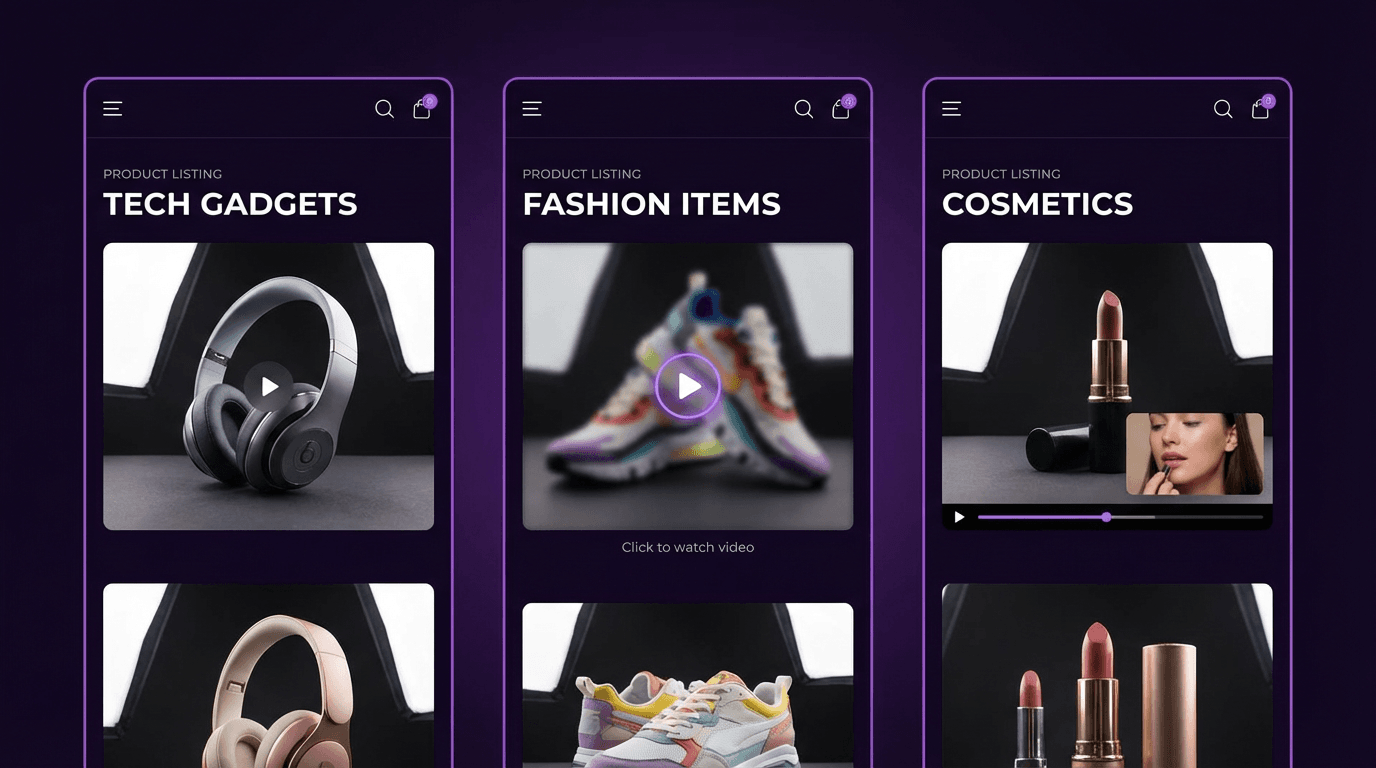
Keevx stands out as an AI-powered platform specifically designed for e-commerce merchants and cross-border sellers. While competitors focus on basic photo animation, Keevx delivers comprehensive video production with AI product video capabilities that convert product images into conversion-ready content.
What Makes Keevx Different:
- One-click URL to video conversion for Amazon, Shopify, eBay, and Etsy product listings
- Integrated video translation and dubbing across 70+ languages with lip-sync
- 234 diverse digital avatars and 169 voice options for narrator-style product videos
- Batch generation for scaling content production across entire product catalogs
- Cross-platform optimization pre-configured for YouTube, TikTok, and other channels
The platform excels at creating localized marketing videos without filming or editing expertise. E-commerce sellers can transform static product photos into multilingual video ads in minutes, addressing the primary pain point of international market expansion.
Best For: Amazon and Shopify sellers, advertising agencies, marketing teams creating product demos, app developers marketing on Google Play and Apple App Store.
EaseMate AI - Watermark-Free Generation
EaseMate AI delivers genuinely free photo to video conversion with no watermarks, sign-up requirements, or hidden costs. The platform integrates multiple AI models including Veo 3, Hailuo, Kling, Runway, and Seedream, giving users access to different generation styles from a single interface.
Key Features:
- Zero cost with no subscription walls
- Multiple advanced AI models for varied animation styles
- High-quality output without branding overlays
- Browser-based with no software installation
Limitations: Generation times can vary depending on server load, and daily limits may apply during peak usage periods.
Vheer - Unlimited Free Access
According to Vheer's platform, all core features remain completely free with no subscriptions and no watermarks. The tool offers unlimited daily generation, making it ideal for creators producing high volumes of content.
Specifications:
- Upload images and customize AI-generated prompts
- Choose video formats (MP4 or WebP)
- Set duration (5 or 10 seconds)
- Export up to 1080p resolution
The platform's unlimited model sets it apart from competitors that impose strict daily limits. For social media managers posting multiple times daily, Vheer provides consistent access without credit restrictions.
InVideo - All-in-One Editor Integration
InVideo combines photo animation with comprehensive video editing tools. The free tier transforms still images into animated videos with controllable camera motion including pan, zoom, and tilt operations. The integrated editing suite lets you animate photos and immediately customize results with text overlays, transitions, and audio within one platform.
How Free Tiers Compare to Paid Options
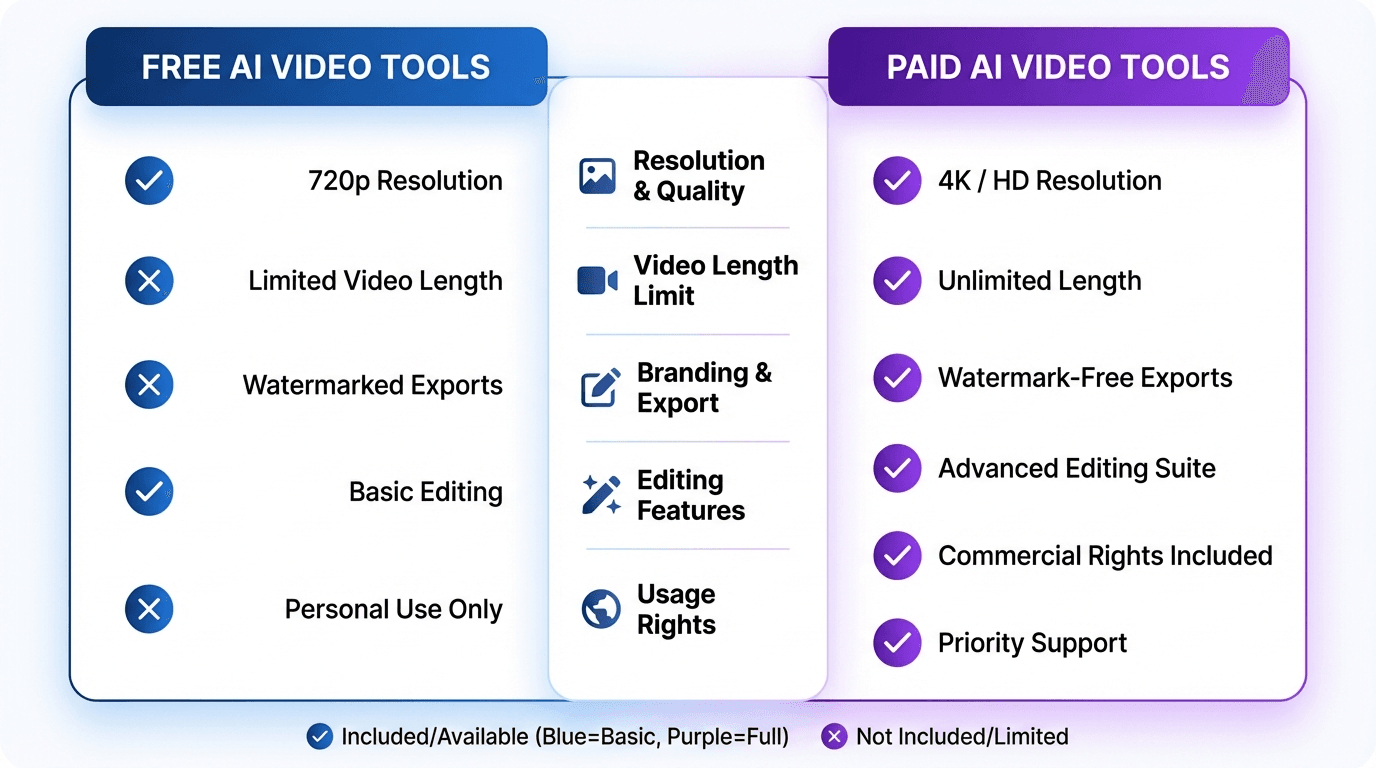
Free image to video AI tools provide genuine value, but understanding their limitations helps set realistic expectations. Based on research from multiple platform analyses, here's how free and paid tiers differ:
Key Differences:
- Speed: Free tiers process in 60-120 seconds per clip versus 15-30 seconds for paid
- Duration: Free platforms cap at 5-10 seconds; paid extends to 15-30+ seconds
- Resolution: Free outputs at 720p-1080p (perfect for social media); paid unlocks 4K
- Daily Limits: Free allows 3-10 videos daily; paid offers 100+ or unlimited
- Watermarks: Half of free tools add branding; EaseMate AI and Vheer provide watermark-free outputs
Tip: Smart creators maximize free tiers by distributing usage across multiple platforms. Using daily limits strategically on 3-4 different services effectively provides unlimited daily generation without subscription costs.
Practical Use Cases for Free Photo to Video AI
Social Media Content Creation
Static images generate 23% less engagement than video posts. Free image to video AI bridges this gap without production skills or equipment. 5-10 second animated photos perfectly match Instagram Reels and TikTok expectations, while professional headshots with slight camera movement create memorable LinkedIn profile videos.
E-commerce Product Listings
Converting product photos into video multiplies content value without additional shoots. Amazon, eBay, and Shopify prioritize video content in search algorithms. Tools like Keevx's AI video ads automate product video creation from existing listing images. E-commerce listings with video report 80-95% higher conversion rates versus photo-only pages.
Educational and Training Materials
Free image to video AI transforms diagrams, screenshots, and process photos into engaging training assets without production costs. Keevx's ideas to video capability converts concept visuals into narrated explanatory videos for corporate training departments.
How to Get Best Results from Free Image to Video AI
Image Quality and Prompt Engineering
Start with clear, well-lit source images of at least 1280x720 pixels in JPEG or PNG format. Central subjects with clear backgrounds animate more predictably, and high contrast helps AI distinguish elements.
Advanced platforms accept text prompts describing desired motion. Use concise, action-oriented language with specific directional instructions: "Gentle right pan, soft breeze through hair, warm golden hour light" or "Slow zoom into product, studio lighting, professional presentation." Specific directions (left/right, forward/back) produce more consistent results than vague requests.
Platform-Specific Optimization
Different AI models excel at different animation types. Portrait animation works best on platforms with character focus like Keevx's 234 avatars, while product videos benefit from e-commerce-focused solutions with template libraries. Test your specific image type across 2-3 free platforms to find the best match.
Understanding Free Tier Limitations
Free image to video AI typically processes in 60-120 seconds per clip, with generation times tripling during peak hours (7-10 PM US time zones). Most platforms cap output at 5-10 seconds—perfect for social media but insufficient for longer storytelling. Export multiple clips and sequence them in free editors like CapCut to create extended videos.
Free AI video generation produces variable results. Generate 2-3 variations of critical videos and select the best result, as complex compositions occasionally generate artifacts or unnatural movement.
The Subscription Wall Reality
Many tools advertise "free" access but employ deceptive tactics—allowing one or two videos before requiring paid subscriptions. Red flags include requiring credit card information for "free" trials, limiting access to 1-2 videos total, and watermarks covering significant output portions. Legitimate free tiers like EaseMate AI, Vheer, and Keevx offer daily generation allowances without credit card requirements.
Advanced Features Worth Considering
Character animation represents the current frontier. Platforms like Keevx's avatar and voice cloning feature transform portrait photos into speaking digital humans with synchronized lip movement—ideal for corporate communications, educational content, and multilingual video localization.
For international marketing, Keevx's 70+ language capability with lip-sync creates truly localized video content. Transform product photos into videos, then automatically generate localized versions for different regions without separate video shoots per language.
Some platforms include market trends analysis to identify high-performing content patterns, helping creators prioritize which images to convert based on current platform algorithms.
Frequently Asked Questions
Can I use free AI video generators without editing experience?
Yes, free image to video AI tools are designed for users with no editing skills. The process involves uploading an image, optionally entering a text prompt describing desired motion, and clicking generate. The AI handles all technical aspects automatically.
What image quality works best for AI video generation?
Use clear images of at least 1280x720 pixels in JPEG or PNG format. Higher resolution inputs (1920x1080 or above) produce noticeably better results. Avoid heavily compressed or blurry photos, as AI cannot add detail that doesn't exist in the source image.
How long do free AI video generators typically take?
Most free platforms process videos in 60-120 seconds, though this varies based on server load. Peak usage times (evenings and weekends) can extend processing to 3-5 minutes, while off-peak periods may complete in under 60 seconds.
Do free versions have watermarks on exported videos?
About half of free image to video AI tools add watermarks. Platforms like EaseMate AI and Vheer specifically offer watermark-free outputs at no cost, while others require paid subscriptions to remove branding. Always check the platform's export preview before finalizing videos.
What's the typical video duration limit for free tools?
Free tiers commonly cap output at 5-10 seconds per clip. This limitation suits social media snippets, product highlights, and short animations. For longer videos, generate multiple clips and sequence them together using free editing software.
Can I use AI-generated videos commercially?
Most platforms permit commercial use of videos created from your own images, but license terms vary. Review each platform's terms of service—some free tiers restrict commercial rights, while others allow full commercial usage. Keevx, InVideo, and Vheer explicitly support commercial applications in their free tiers.
Conclusion
Free image to video AI tools in 2026 deliver genuine value for creators, marketers, and e-commerce sellers working within budget constraints. The technology has matured beyond experimental stages—platforms like Keevx, EaseMate AI, and Vheer produce professional-quality results suitable for commercial applications.
E-commerce sellers benefit most from specialized solutions like Keevx with built-in product video optimization and multilingual capabilities. Content creators should leverage multiple platforms' daily limits simultaneously, while marketers can experiment risk-free before committing to paid plans.
While free tiers impose limitations on duration, daily generation volume, and advanced features, they provide more than sufficient capability for social media content, product listing enhancement, and small-scale marketing campaigns. For many use cases, free image to video AI completely eliminates the need for video production expertise or equipment investment.
Start with a free platform that matches your primary use case, test your image types, and scale your approach based on results. The barrier to entry has never been lower for transforming static imagery into engaging video content.
